StepGoals version 2.0 shipped in early April 2026 with something users have been asking for since launch: a native Apple Watch app. Well, the wait is over. Your current step count, distance walked, calories burned, and progress ring are now on your wrist throughout the day, no phone required. It's the same data you've been tracking on iPhone, now available the moment you glance down.
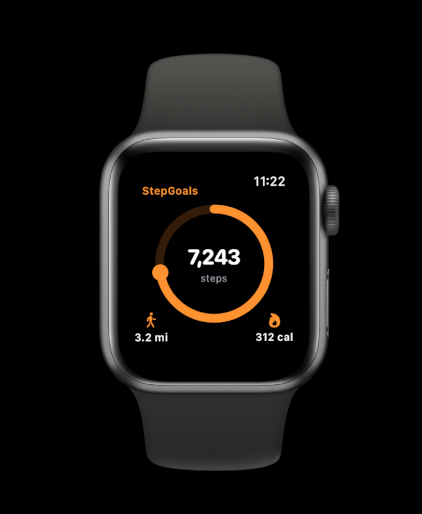
What's on the Watch
The StepGoals watch app is built around the same visual language as the iPhone app. The orange progress ring sits at the center of the screen, filling as your step count climbs toward your daily goal. Inside the ring your current step count is displayed prominently, with your distance and calorie figures shown below — distance on the left, calories on the right.
Everything is readable in a single glance. There's no scrolling, no navigating through menus. You raise your wrist, you see where you stand. That's the whole point. The watch face is intentionally focused,it gives you the one thing you actually want to know mid-walk or mid-day: how far along you are.
Why Having It on Your Wrist Matters
Pulling out your phone to check your step count represents a bit of friction, but even small frictions add up. In a meeting, on a run, in the middle of a conversation, the watch is always there. That constant low-effort visibility changes how often you check in with your progress, and more check-ins means more moments to make a decision to take the stairs, walk the long way back and fit in one more loop of the block before heading inside.
There's also a motivational dimension to glanceability. Seeing your progress ring at 60% at 3pm is a fundamentally different experience than discovering the same number at 9pm when there's less time to act on it. The watch surfaces your step count at the moments when you can still do something about it. That's not a small thing, it's one of the core mechanics behind how habit tracking actually changes behavior.
Accuracy: Why Apple Watch Steps Can Differ from iPhone Steps
Apple Watch tracks steps using an accelerometer on your wrist rather than one in your pocket. For certain types of movement, particularly activities where your phone stays still but your arms and legs are moving, like grocery shopping with a bag, pushing a stroller, or walking with your hands in your pockets, the watch tends to be more accurate. For other activities, like cycling or driving, the watch may log steps that aren't really there.
Apple Health reconciles data from all connected devices and resolves overlaps using a priority hierarchy, generally preferring Apple Watch data when both sources are active simultaneously. StepGoals reads directly from Apple Health, which means it always reflects the best combined picture Apple's algorithm can produce. If you wear an Apple Watch and carry an iPhone, you're getting the most complete step record either device can offer.
It's worth knowing that your daily step goal should account for this — if you're switching from iPhone-only tracking to iPhone + Apple Watch, your counts may rise slightly as activities that were previously undercounted get captured more completely by the watch.
Everything Stays in Sync
The watch app and the iPhone app share the same data source: Apple Health. There's no separate syncing step, no account to manage, and no risk of your numbers diverging between devices. Open the iPhone app after a walk and your steps are already there. Check the watch mid-day and it reflects the same running total. Streaks, goal progress, and milestones all live on the iPhone app and update as your Apple Health data updates — the watch is a read-only window into that same data, designed purely for speed and convenience.
How to Get It
The Apple Watch app ships as part of StepGoals version 2.0, available now on the App Store. If you have automatic updates enabled, it may already be installed. If not, open the App Store, search for StepGoals, and tap Update.
Once updated on iPhone, open the Watch app on your iPhone, scroll to the Available Apps section, and install StepGoals on your watch from there. The app will appear on your watch immediately. From that point, your step count is always a wrist-raise away.
Version 2.0 also introduced the GPS Sessions tab for logging outdoor walks and runs with live route tracking, and if you haven't explored that yet, it pairs well with the watch app for anyone who wants both at-a-glance step data and detailed session records. You can read more about what makes StepGoals different if you're new to the app.
Update to StepGoals 2.0 to get the Apple Watch app, it's free for all users.
