Frequently Asked Questions
Everything you need to know about StepGoals.
Getting Started
How does StepGoals track my steps?
StepGoals reads your step data directly from Apple Health. Your iPhone's built-in motion sensor records your movement, and Apple Health passes that data to StepGoals. This means your step count in StepGoals will always match what you see in the Apple Health app.
How do I set my daily step goal?
Tap the Settings tab, then tap Goals. Enter any number and save. Your new goal takes effect immediately. You can also set custom goals for distance, calories, active time, and floors climbed from the same screen.
Does StepGoals work with Apple Watch?
Apple Watch integration is coming soon. In the meantime, if you wear an Apple Watch it will sync your activity to Apple Health automatically, and StepGoals reads from Apple Health — so your watch data is already included without any extra setup.
How do I activate the widgets?
Long-press any empty area on your home screen until apps jiggle, then tap the + button in the top corner. Search for StepGoals, choose your preferred size, and tap Add Widget.
Tracking & Features
What fitness metrics does StepGoals track?
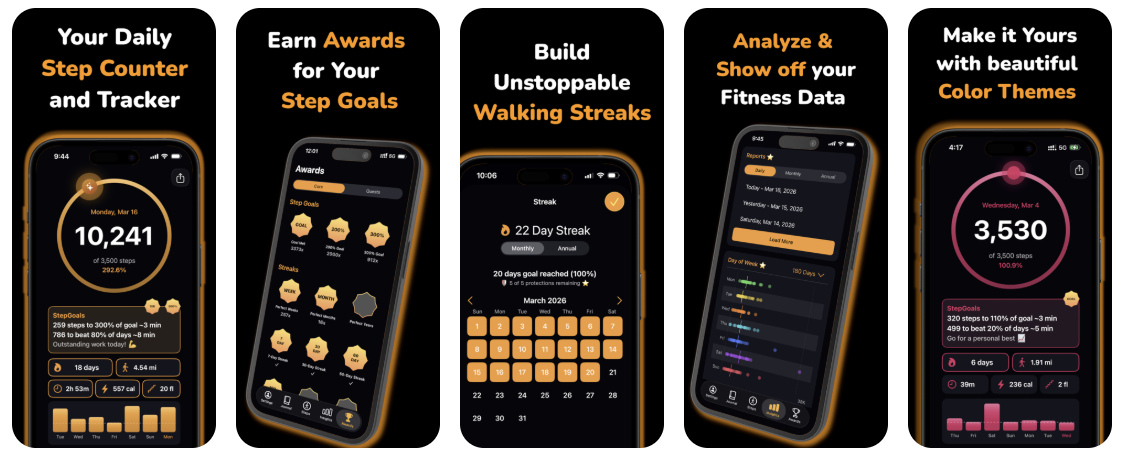
StepGoals tracks steps, distance, calories burned, active minutes, and floors climbed — all pulled from Apple Health. Your daily totals for each metric are shown below your step progress ring on the main screen.
What are Motivation Targets?
Motivation Targets are personalized intermediate milestones shown throughout the day. Rather than only showing your full daily goal — which can feel out of reach mid-day — StepGoals calculates a sequence of closer, achievable targets to keep you moving. Each target includes an estimated time to completion, and the targets update dynamically as you reach them, always giving you a clear and motivating next step.
How do I customize the Motivation Box?
Tap the Motivation Box on the main screen to open the Daily Motivation screen. From there you can control which targets are prioritized and toggle whether time estimates are displayed.
How do I adjust my walking pace for time estimates?
Motivation Targets show an estimated time to completion based on your pace setting. To change it, go to Settings → Preferences → Walking Pace and select the option that best matches your typical walking speed.
How does streak tracking work?
You earn a streak day when you hit your daily step goal before midnight in your local time zone. Hit your goal on consecutive days and your streak grows. Miss a day and your streak resets to zero — unless you have a streak protection to cover it.
What are streak protections and how do I use them?
Streak protections let you save your streak on days when you fall short of your goal. Free users receive 2 protections per month. Pro users receive 5. Streak protections are applied automatically until they are exhausted.
How often does the widget refresh?
StepGoals widgets refresh approximately every 15–30 minutes. iOS controls the exact timing based on battery level and how frequently you use the app. Opening StepGoals will also trigger a widget update.
How accurate is the step data?
StepGoals receives data from Apple Health. Accuracy is highest when your phone is carried in a tight hip pocket. It tends to undercount steps if your phone is in a loose bag, and can overcount if you make repetitive arm movements while holding it, like folding laundry. Research suggests Apple Health is fairly accurate at a steady walking pace but can be less reliable with slower or incidental movement.
How does the app handle timezone changes?
Streaks and daily goals reset at midnight in your current local time zone. Step counts reflect whatever Apple Health recorded for the day.
How does the app handle days with no step data?
Days with zero steps are treated as missed days for streak purposes — unless you have a streak protection available, which will be applied automatically. Days with no data are excluded from your daily rank as they imply your phone was not used.
Will StepGoals drain my battery?
StepGoals reads step data from Apple Health passively — it doesn't use GPS, run continuous background processes, or maintain a network connection. Battery impact is minimal.
StepGoals Pro
What do I get with StepGoals Pro?
StepGoals Pro unlocks the following features:
- Ad-free experience — no interruptions, ever
- 5 streak protections per month (vs. 2 on the free plan)
- Full reports — weekly, monthly, and yearly insights with detailed analytics
- Color themes — 5 themes to personalize the app's appearance
- Top Ten metrics — see your all-time best days for every tracked metric
- Weekly Average widgets — home screen widgets showing your 7-day step average
- Exclusive awards and quests — Pro-only achievements to unlock
I purchased Pro but it's not showing. How do I restore?
Tap the Settings tab, then tap Restore Purchases. This reconnects your App Store purchase to your account. Make sure you're signed into the same Apple ID used when you originally purchased.
Privacy & Data
Where is my data stored?
All your data — steps, streaks, goals, and journal entries — is stored locally on your device. StepGoals does not upload your personal data to any external server. For full details, see our Privacy Policy.
Troubleshooting
My steps aren't being counted. What do I do?
This is almost always a permissions issue. Try the following:
- Open the iPhone Settings app
- Go to Privacy & Security → Health → StepGoals
- Make sure all categories are set to Read
- Also check Privacy & Security → Motion & Fitness and confirm Fitness Tracking is enabled
- Close and reopen StepGoals
If steps still aren't appearing, open the Apple Health app and confirm your step data is present there. If it isn't, the issue is with your device's motion tracking rather than StepGoals.
My streak looks wrong. What should I check?
Your streak is based on whether you hit your step goal before midnight each day in your local time zone. If a day shows as missed, confirm that your Health permissions are fully enabled and that your step data synced to Apple Health before midnight. If you were close to your goal on a missed day, check whether you have a streak protection available to apply.
How do I contact support?
Email us at hello[at]stepgoals.app. We typically respond within 24 hours. When reaching out about a technical issue, it helps to include your iPhone model, iOS version, and a description of what you're seeing.