The Motivation Box is a live coaching feature in the StepGoals iPhone step tracking app that shows two personalized step targets and a context-aware message, updating throughout the day as you move.
Staring at 10,000 steps (or your ambitious goal) at 9am is not always motivating. It's a number that belongs to a future version of you, but right then it just feels far away. This StepGoals pedometer feature is designed to fix that.
Why I built this
Before StepGoals, I used a number of popular iPhone step counter and pedometer apps. They were good at recording what I'd done, but none of them were very good at motivating me in the moment. I'd open the app mid-afternoon, see I was at 4,200 steps with a 10,000 step goal, and close it feeling behind rather than energized.
The thing is, I wasn't failing. I was having a busy day. Back-to-back meetings, the kind of day where dedicated exercise time is hard to come by. But I knew from experience that busy days have hidden opportunities — a slightly longer route to a meeting, taking the stairs, a walk around the block while on a call, a snack break. The gap between 4,200 and 10,000 felt too wide to bother. The gap between 4,200 and 5,000 did not.
That's the insight behind the Motivation Box. On the days when you can't carve out a 30-minute walk, small decisions compound. A nudge toward the next 800 steps is often all it takes to make a different choice, and those choices, repeated across a busy day, close the gap.
What's in the box
The Motivation Box shows two targets and beneath them, a short motivational message. It lives on the main screen of the StepGoals walking app, front and center — no digging through menus.
Together they give you a near-term focus, some context for how your day is going, and a bit of encouragement — without any math on your part.
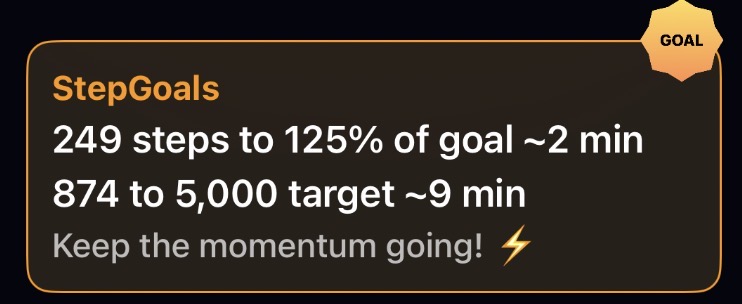
The first target
The first target always shows the next unbeaten milestone in a progression tied to your goal. Starting from 25% of your daily goal, it works its way through 50%, 75%, 90%, 100%, and then keeps going — 110%, 125%, 150%, all the way up to your best day this week, best day this month, best day this year, and finally your all-time personal record.
As you hit each one, the target advances. On a strong day, you can find yourself chasing your personal record before the afternoon is over.
Each target also shows an optional estimated time to reach it — for example, "1,240 steps to 75% of goal ~12 min." You can turn estimates on or off from the Daily Motivation screen, and tune the accuracy by setting your walking pace under Settings → Preferences → Walking Pace.
The second target
The second target puts today in context of your history. In its default Smart mode, it finds the nearest meaningful threshold — whether that's a step count tied to an upcoming award, or a ranking milestone pulled from your own data, like "840 steps to beat 50% of your days" or "1,500 steps to your top 10 days ever."
This is one of the more quietly compelling parts of the app. You're not being compared to anyone else, just to your own record. Seeing "top 20 days" within reach on an otherwise average afternoon has a way of changing your plans for the next 15 minutes.
You can switch the secondary target between three modes from the Daily Motivation screen:
| Mode | What it shows |
|---|---|
| Smart (default) | The nearest meaningful threshold — an upcoming award, a ranking milestone, or a personal record within reach |
| Rank | Percentile and top-N targets based on your own step history — e.g. "840 steps to beat 50% of your days" |
| Comparison | How today tracks against your 7-day, 30-day, or yearly average |
The motivational message
The bottom line of the box is a short, context-aware message that shifts based on what's happening. After 8pm, if your goal isn't met and you have an active streak, it switches to streak-urgency mode — either reminding you how many steps you need to protect it, or noting that a protection is available. Earlier in the day it cycles through messages tied to the time of day and how far through your goal you are.
Why Small Step Targets Make a Big Difference
The Motivation Box is a small piece of screen real estate, but it does a lot of quiet work. Behavioural research supports the underlying idea: a landmark review by Locke and Latham (2002) in American Psychologist found that proximal sub-goals consistently outperform single distal targets for sustaining effort — particularly when the end goal feels distant. On days when your step goal feels like a stretch, having a target that's only 400 steps away — and knowing you can get there in about 4 minutes — is often the nudge that keeps the streak alive. It's a meaningful edge that most step counter and pedometer apps simply don't offer.
Try the StepGoals Motivation Box on iPhone
The Motivation Box is live in StepGoals now. We're proud of its design as a unique feature that helps you outsmart yourself. Open the app, check your targets, and tap the box to customize how it works for you. On your next busy day — the kind where a workout isn't in the cards — let it show you what's actually within reach.
StepGoals is one of the top-rated motivational step tracking apps for iPhone — see how it compares to the competition.
Download StepGoals free and try the Motivation Box today.
